To Develop a Simple M-Commerce Application
Code:


 Hope you like the post, comment bellow for Query and Feedback :)
Code:
/*To Develop a Simple M-Commerce Application*/
import javax.microedition.lcdui.*;
import javax.microedition.midlet.MIDlet;
import java.util.*;
public class Practical10 extends MIDlet implements CommandListener
{
Form frm1;
Form frm2;
Form frm3;
Form frm4;
Form frm5;
Form frm6;
Form frm7;
TextField tfUName;
TextField tfPswd;
TextField Amount;
String s1, s2, s3;
ChoiceGroup cgAccount;
ChoiceGroup cgTrans;
Command cmdOk; //frm1
Command cmdExit1;//frm1
Command cmdSignIn;//frm2
Command cmdBack;//frm2
Command cmdNextTR;//frm3
Command cmdBackLG;//frm3
Command cmdBackAC;//frm4
Command cmdPAmount;//frm4
Command cmdBackTR;//frm5
Command cmdNote;//frm5
Command cmdExit2;//page7
Command cmdExit3;//page6
Command cmdExit4;//page7
Command cmdExit5;//page6
private Display display;
private Ticker ticker;
public Practical10()
{
try
{
frm1 = new Form("Welcome");
frm2 = new Form("Login");
frm3 = new Form("Account Type");
frm4 = new Form("Transaction Page");
frm5 = new Form("Amount Page");
frm6 = new Form("Balance");
frm7 = new Form("Receipt");
ticker = new Ticker ("WELCOME TO THE ATM,PRESS NEXT TO ENTER");
display = Display.getDisplay(this);
cmdOk=new Command("NEXT",Command.SCREEN,1);//frm1
cmdExit1=new Command("EXIT",Command.EXIT,0);//frm1
tfUName=new TextField("Enter User Name : ","",30,TextField.ANY);
tfPswd=new TextField("Enter Password : ","",30,TextField.ANY);
cmdBack=new Command("BACK",Command.BACK,0);//frm2
cmdSignIn=new Command("SignIn",Command.SCREEN,1);//frm2
cgAccount=new ChoiceGroup("Type of Account : ",Choice.EXCLUSIVE);
cgAccount.append("Saving a/c",null);
cgAccount.append("Current a/c",null);
cmdBackLG=new Command("BACK",Command.BACK,0);//frm3
cmdNextTR=new Command("NEXT",Command.SCREEN,1);//frm3
cgTrans=new ChoiceGroup("Type of Transaction : ",Choice.EXCLUSIVE);
cgTrans.append("Withdrawal ",null);
cgTrans.append("Balance",null);
cmdBackAC=new Command("BACK",Command.BACK,0);//frm4
cmdPAmount=new Command("NEXT",Command.SCREEN,1);//frm4
Amount=new TextField("Enter Amount to withdraw : ","",10,TextField.ANY);
cmdBackTR=new Command("BACK",Command.BACK,0);//frm5
cmdNote=new Command("Next",Command.SCREEN,1);//frm5
cmdExit2=new Command("BACK",Command.BACK,0);//page7
cmdExit3=new Command("BACK",Command.BACK,0);//page6
cmdExit4=new Command("EXIT",Command.BACK,0);//page7
cmdExit5=new Command("EXIT",Command.BACK,0);//page6
}
catch(Exception e)
{
System.out.println (e);
}
}
public void startApp()
{
frm1.addCommand(cmdOk);
frm1.addCommand(cmdExit1);
try
{
Image im = Image.createImage("/images.jpg");
frm1.append(new ImageItem(null, im, ImageItem.LAYOUT_CENTER , null));
frm1.setTicker(ticker);
display.setCurrent(frm1);
}
catch (java.io.IOException e)
{
System.err.println("Unable to locate or read .jpg file");
}
frm1.setCommandListener(this);
frm2.addCommand(cmdBack);
frm2.addCommand(cmdSignIn);
frm2.append(tfUName);
frm2.append(tfPswd);
display=Display.getDisplay(this);
frm2.setCommandListener(this);
String msg = "PLEASE SELECT AN ACCOUNT TYPE FOR TRANSACTION";
frm3.append(msg);
frm3.append(cgAccount);
frm3.addCommand(cmdBackLG);
frm3.addCommand(cmdNextTR);
frm3.setCommandListener(this);
display=Display.getDisplay(this);
frm4.append(cgTrans);
frm4.addCommand(cmdBackAC);
frm4.addCommand(cmdPAmount);
frm4.setCommandListener(this);
display=Display.getDisplay(this);
frm5.addCommand(cmdBackTR);
frm5.addCommand(cmdNote);
frm5.append(Amount);
display=Display.getDisplay(this);
frm5.setCommandListener(this);
frm7.addCommand(cmdExit2);
frm7.addCommand(cmdExit4);
display=Display.getDisplay(this);
frm7.setCommandListener(this);
frm6.addCommand(cmdExit3);
frm6.addCommand(cmdExit5);
display=Display.getDisplay(this);
frm6.setCommandListener(this);
}
public void pauseApp(){}
public void destroyApp(boolean unconditional)
{
notifyDestroyed();
}
public void commandAction(Command c,Displayable d)
{
try
{
if(c==cmdExit1)
{
destroyApp(false);
notifyDestroyed();
}
if(c==cmdOk)
{
display.setCurrent(frm2);
}
if(c==cmdSignIn)
{
s2 = tfUName.getString();
s3 = tfPswd.getString();
if((s2.equals("scott"))&&(s3.equals("tiger")))
{
display.setCurrent(frm3);
}
}
if(c==cmdBack)
{
display.setCurrent(frm1);
}
if(c==cmdBackLG)
{
display.setCurrent(frm2);
}
if(c==cmdNextTR)
{
display.setCurrent(frm4);
}
if(c==cmdBackAC)
{
display.setCurrent(frm3);
}
if(c==cmdNote)
{
s1 = Amount.getString();
int s4 = Integer.parseInt(s1);
if(s4>1000)
{
Alert bal1 = new Alert("Transaction not allowed","Minimum balance required:500", null, AlertType.INFO);
bal1.setTimeout(5000);
display.setCurrent(bal1,frm7);
}
else
{
frm7.append("You have withdrawn Rs: " + s1 + "from your account");
display.setCurrent(frm7);
}
}
if(c==cmdPAmount)
{
boolean choice1;
choice1 = cgTrans.isSelected(0);
/* boolean choice2;
choice2 = cgTrans.isSelected(1); */
if(choice1 == true)
{
display.setCurrent(frm5);
}
else
//if(choice2 == true)
{
int savBal = 1500;
int curBalance = 1500;
int s4 = Integer.parseInt(s1);
boolean accType1;
accType1 = cgAccount.isSelected(0);
if(accType1 == true)
{
savBal=savBal-s4;
}
boolean accType2;
accType2 = cgAccount.isSelected(1);
if(accType2 == true)
{
curBalance=curBalance-s4;
}
String msg1 = "saving account: "+savBal+"\n current acount: "+curBalance;
frm6.append(msg1);
display.setCurrent(frm6);
}
}
if(c==cmdBackTR)
{
display.setCurrent(frm4);
}
if(c==cmdExit2)
{
display.setCurrent(frm4);
}
if(c==cmdExit3)
{
display.setCurrent(frm4);
}
if(c==cmdExit4)
{
destroyApp(false);
notifyDestroyed();
}
if(c==cmdExit5)
{
destroyApp(false);
notifyDestroyed();
}
}
catch(Exception e)
{
System.out.println("Error!!!!!!!!");
}
}
}
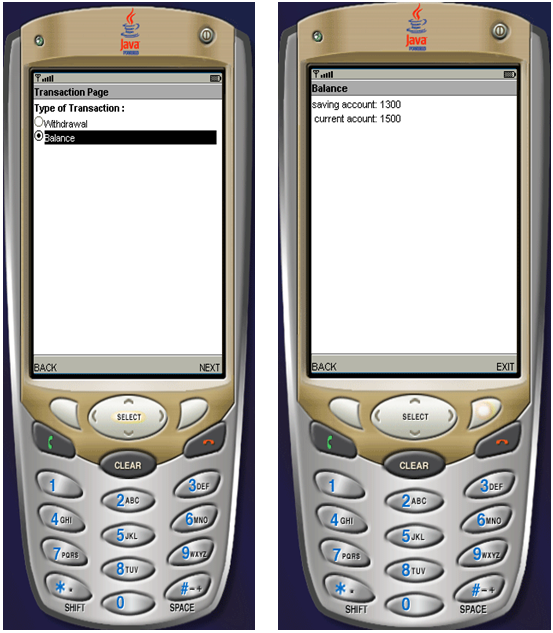
Sample Outputs:import javax.microedition.lcdui.*;
import javax.microedition.midlet.MIDlet;
import java.util.*;
public class Practical10 extends MIDlet implements CommandListener
{
Form frm1;
Form frm2;
Form frm3;
Form frm4;
Form frm5;
Form frm6;
Form frm7;
TextField tfUName;
TextField tfPswd;
TextField Amount;
String s1, s2, s3;
ChoiceGroup cgAccount;
ChoiceGroup cgTrans;
Command cmdOk; //frm1
Command cmdExit1;//frm1
Command cmdSignIn;//frm2
Command cmdBack;//frm2
Command cmdNextTR;//frm3
Command cmdBackLG;//frm3
Command cmdBackAC;//frm4
Command cmdPAmount;//frm4
Command cmdBackTR;//frm5
Command cmdNote;//frm5
Command cmdExit2;//page7
Command cmdExit3;//page6
Command cmdExit4;//page7
Command cmdExit5;//page6
private Display display;
private Ticker ticker;
public Practical10()
{
try
{
frm1 = new Form("Welcome");
frm2 = new Form("Login");
frm3 = new Form("Account Type");
frm4 = new Form("Transaction Page");
frm5 = new Form("Amount Page");
frm6 = new Form("Balance");
frm7 = new Form("Receipt");
ticker = new Ticker ("WELCOME TO THE ATM,PRESS NEXT TO ENTER");
display = Display.getDisplay(this);
cmdOk=new Command("NEXT",Command.SCREEN,1);//frm1
cmdExit1=new Command("EXIT",Command.EXIT,0);//frm1
tfUName=new TextField("Enter User Name : ","",30,TextField.ANY);
tfPswd=new TextField("Enter Password : ","",30,TextField.ANY);
cmdBack=new Command("BACK",Command.BACK,0);//frm2
cmdSignIn=new Command("SignIn",Command.SCREEN,1);//frm2
cgAccount=new ChoiceGroup("Type of Account : ",Choice.EXCLUSIVE);
cgAccount.append("Saving a/c",null);
cgAccount.append("Current a/c",null);
cmdBackLG=new Command("BACK",Command.BACK,0);//frm3
cmdNextTR=new Command("NEXT",Command.SCREEN,1);//frm3
cgTrans=new ChoiceGroup("Type of Transaction : ",Choice.EXCLUSIVE);
cgTrans.append("Withdrawal ",null);
cgTrans.append("Balance",null);
cmdBackAC=new Command("BACK",Command.BACK,0);//frm4
cmdPAmount=new Command("NEXT",Command.SCREEN,1);//frm4
Amount=new TextField("Enter Amount to withdraw : ","",10,TextField.ANY);
cmdBackTR=new Command("BACK",Command.BACK,0);//frm5
cmdNote=new Command("Next",Command.SCREEN,1);//frm5
cmdExit2=new Command("BACK",Command.BACK,0);//page7
cmdExit3=new Command("BACK",Command.BACK,0);//page6
cmdExit4=new Command("EXIT",Command.BACK,0);//page7
cmdExit5=new Command("EXIT",Command.BACK,0);//page6
}
catch(Exception e)
{
System.out.println (e);
}
}
public void startApp()
{
frm1.addCommand(cmdOk);
frm1.addCommand(cmdExit1);
try
{
Image im = Image.createImage("/images.jpg");
frm1.append(new ImageItem(null, im, ImageItem.LAYOUT_CENTER , null));
frm1.setTicker(ticker);
display.setCurrent(frm1);
}
catch (java.io.IOException e)
{
System.err.println("Unable to locate or read .jpg file");
}
frm1.setCommandListener(this);
frm2.addCommand(cmdBack);
frm2.addCommand(cmdSignIn);
frm2.append(tfUName);
frm2.append(tfPswd);
display=Display.getDisplay(this);
frm2.setCommandListener(this);
String msg = "PLEASE SELECT AN ACCOUNT TYPE FOR TRANSACTION";
frm3.append(msg);
frm3.append(cgAccount);
frm3.addCommand(cmdBackLG);
frm3.addCommand(cmdNextTR);
frm3.setCommandListener(this);
display=Display.getDisplay(this);
frm4.append(cgTrans);
frm4.addCommand(cmdBackAC);
frm4.addCommand(cmdPAmount);
frm4.setCommandListener(this);
display=Display.getDisplay(this);
frm5.addCommand(cmdBackTR);
frm5.addCommand(cmdNote);
frm5.append(Amount);
display=Display.getDisplay(this);
frm5.setCommandListener(this);
frm7.addCommand(cmdExit2);
frm7.addCommand(cmdExit4);
display=Display.getDisplay(this);
frm7.setCommandListener(this);
frm6.addCommand(cmdExit3);
frm6.addCommand(cmdExit5);
display=Display.getDisplay(this);
frm6.setCommandListener(this);
}
public void pauseApp(){}
public void destroyApp(boolean unconditional)
{
notifyDestroyed();
}
public void commandAction(Command c,Displayable d)
{
try
{
if(c==cmdExit1)
{
destroyApp(false);
notifyDestroyed();
}
if(c==cmdOk)
{
display.setCurrent(frm2);
}
if(c==cmdSignIn)
{
s2 = tfUName.getString();
s3 = tfPswd.getString();
if((s2.equals("scott"))&&(s3.equals("tiger")))
{
display.setCurrent(frm3);
}
}
if(c==cmdBack)
{
display.setCurrent(frm1);
}
if(c==cmdBackLG)
{
display.setCurrent(frm2);
}
if(c==cmdNextTR)
{
display.setCurrent(frm4);
}
if(c==cmdBackAC)
{
display.setCurrent(frm3);
}
if(c==cmdNote)
{
s1 = Amount.getString();
int s4 = Integer.parseInt(s1);
if(s4>1000)
{
Alert bal1 = new Alert("Transaction not allowed","Minimum balance required:500", null, AlertType.INFO);
bal1.setTimeout(5000);
display.setCurrent(bal1,frm7);
}
else
{
frm7.append("You have withdrawn Rs: " + s1 + "from your account");
display.setCurrent(frm7);
}
}
if(c==cmdPAmount)
{
boolean choice1;
choice1 = cgTrans.isSelected(0);
/* boolean choice2;
choice2 = cgTrans.isSelected(1); */
if(choice1 == true)
{
display.setCurrent(frm5);
}
else
//if(choice2 == true)
{
int savBal = 1500;
int curBalance = 1500;
int s4 = Integer.parseInt(s1);
boolean accType1;
accType1 = cgAccount.isSelected(0);
if(accType1 == true)
{
savBal=savBal-s4;
}
boolean accType2;
accType2 = cgAccount.isSelected(1);
if(accType2 == true)
{
curBalance=curBalance-s4;
}
String msg1 = "saving account: "+savBal+"\n current acount: "+curBalance;
frm6.append(msg1);
display.setCurrent(frm6);
}
}
if(c==cmdBackTR)
{
display.setCurrent(frm4);
}
if(c==cmdExit2)
{
display.setCurrent(frm4);
}
if(c==cmdExit3)
{
display.setCurrent(frm4);
}
if(c==cmdExit4)
{
destroyApp(false);
notifyDestroyed();
}
if(c==cmdExit5)
{
destroyApp(false);
notifyDestroyed();
}
}
catch(Exception e)
{
System.out.println("Error!!!!!!!!");
}
}
}